A Powerful Video Download Helper
Detect and save compatible video and audio for offline use. Website, browser, and media-format support varies, and protected content is not supported.
Only download content you own or have permission to save. Your use must comply with applicable law and the source website’s terms. See our Terms of Service.
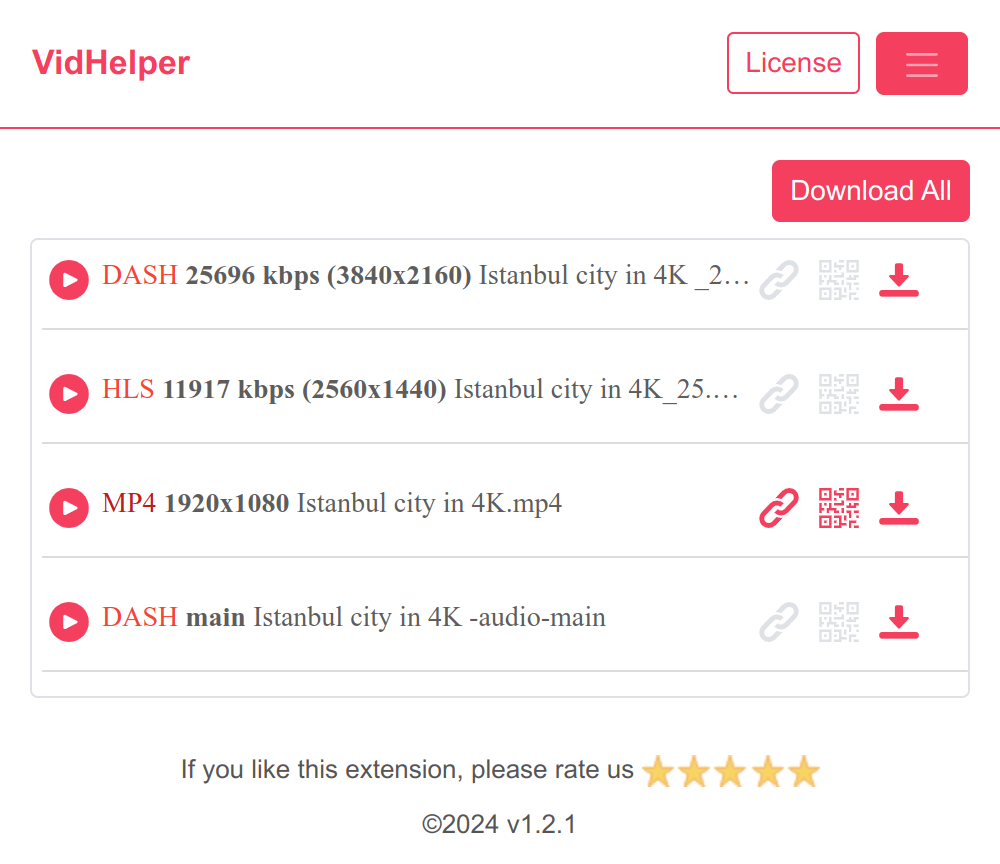
Multiple Ways to Save Compatible Media
Download detected files and supported streams, or use a recording mode when a direct download is unavailable.
A Smoother Download Workflow
Preview, organize, and transfer compatible media from one convenient browser extension.
Quick Toolbar Access
Open VidHelper from your browser toolbar to view media detected on the current page.
Format and Quality Choices
Choose from the formats and resolutions made available by the source and browser.
Batch Download
Queue multiple detected media files when the source and your plan support it.
Preview Before Downloading
Use our built-in media player to preview videos before downloading them.
QR Code Link Sharing
Send a compatible media link to your phone by scanning a QR code.
Free and Pro Options
Start with the free plan, then upgrade for higher usage limits and priority support.
Start for free today
Download VidHelper and start saving your favorite online videos today!
Pricing
Start for free, stay for the value.
Monthly and yearly plans renew automatically until canceled. Taxes may be added at checkout.
Free
$0
Get started for free
- Works with many supported video sites
- Standard video/audio downloads without an hourly plan limit
- 1 supported HD (1080p, 2K, or 4K) download per hour
- 1 supported HLS/DASH download per hour
- Limited to 1 recording every 1 hour for each recording mode
Monthly
$6.90/month
Billed monthly; renews until canceled
- Works with many supported video sites
- Standard video/audio downloads without an hourly plan limit
- No hourly plan limit for supported HD downloads
- No hourly plan limit for supported HLS/DASH downloads
- Support for merging HLS/DASH video and audio streams
- Supports recording mode
- Priority customer support
Yearly
$35/year
$2.92/month, billed yearly; renews until canceled
- Works with many supported video sites
- Standard video/audio downloads without an hourly plan limit
- No hourly plan limit for supported HD downloads
- No hourly plan limit for supported HLS/DASH downloads
- Support for merging HLS/DASH video and audio streams
- Supports recording mode
- Priority customer support
Lifetime
$65one-time
One-time payment; no recurring charge
- Works with many supported video sites
- Standard video/audio downloads without an hourly plan limit
- No hourly plan limit for supported HD downloads
- No hourly plan limit for supported HLS/DASH downloads
- Support for merging HLS/DASH video and audio streams
- Supports recording mode
- Priority customer support
Frequently asked questions
Feel free to contact us if you have any other questions.
How to use VidHelper?
Visit a supported site, start playback if needed, and open the extension. VidHelper will list compatible media it detects. Only download or record content you own or are authorized by law or the rights holder to save.What should I do if VidHelper is not working?
If you are experiencing any problems with VidHelper, please contact us for assistance. We welcome your feedback and ratings, and especially appreciate any suggestions you may have for improving its functionality.
Why can’t VidHelper detect a video?
Some websites load media only after playback starts or use formats and protections that VidHelper cannot access. Try playing the video, reloading the page, and reopening the extension. Compatibility varies by website and browser, and DRM-protected media is not supported.How to upgrade my plan?
To upgrade your plan, please note that the process currently requires manual intervention from our side. To initiate the upgrade, kindly reach out to our support team and provide them with the details of your desired plan. They will assist you in upgrading to the plan that best fits your needs.
Can VidHelper download HLS and DASH streams?
VidHelper supports many HLS (m3u8) and DASH (mpd) streams. Support depends on the website, browser, and stream configuration. DRM-protected or otherwise restricted streams are not supported.Can I cancel my subscription?
You can cancel your subscription at any time. Upon completing your order, please Check your purchase confirmation email and click the 'View Order' button or Visit LemonSqueezy Orders. click on "Sign In" to generate a temporary authorization link. Open the provided link to effortlessly proceed and cancel your subscription.